DevOps and ReliabilityFull Stack Development
Rails in Kubernetes: Migrations, Jobs, and Puma
Running a Ruby on Rails app in Kubernetes means containerizing it correctly and handling migrations, background jobs, and Puma as separate concerns.
· 2 min read
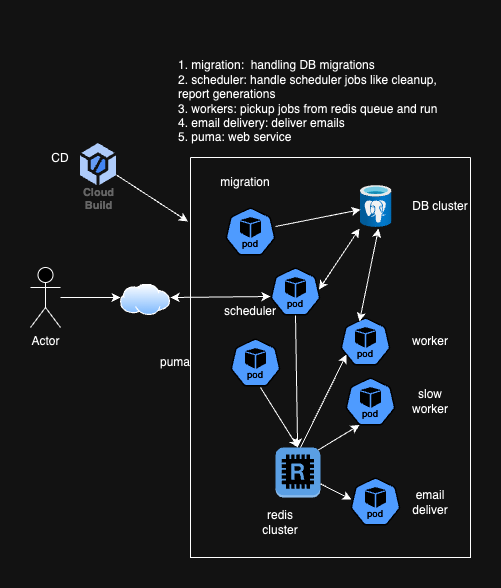
Moving a Rails app onto Kubernetes is not just “put the container in a Deployment.” A Rails app has at least four moving parts that behave differently in a cluster than they did on a single server: migrations, scheduled maintenance tasks, background workers, and the web server itself. Each needs its own Kubernetes primitive.
Containerizing the app
Start with a Dockerfile for the Rails app and build the image in CI, pushing it to a registry the cluster can pull from. Everything downstream depends on having a versioned, reproducible image.
Migrations
Migrations need to run exactly once per deploy, before the new Pods start serving traffic. The common pattern is a Kubernetes Init Container or a pre-deploy Job that runs rails db:migrate and exits. Migrations should be idempotent: a Job can be retried by Kubernetes, and a migration that isn’t safe to run twice will break on retry.
Scheduled maintenance tasks
Anything that used to run from cron on a single box becomes a Kubernetes CronJob: cleanup tasks, report generation, anything periodic. The CronJob YAML defines the schedule and the container to run, and Kubernetes handles the rest, including what happens if a run is missed or still running when the next one is due.
Background workers
Sidekiq or Resque workers run as their own Deployment, separate from the web Pods, so they can scale independently. Queue depth is the natural signal to scale workers on: more backlog, more replicas.
Puma as the web server
Puma runs in the web Deployment behind a Kubernetes Service, load-balanced and scaled like any other stateless workload. Action Mailer needs its own attention here, since SMTP credentials and any third-party mail service configuration have to come from Kubernetes secrets or config maps rather than a local .env file.
Deployment and delivery
Kubernetes manifests (or a Helm chart, if you want templating and versioned releases) tie the pieces together: web Deployment, worker Deployment, CronJobs, and the migration Job. Wire this into CI/CD, whether that’s GitHub Actions, GitLab CI, or Jenkins, so a merge to main results in a real rollout rather than a manual kubectl apply.
Monitoring, logging, and security
Once it’s running, treat it like any other production workload: centralized log aggregation, monitoring on the web and worker Deployments separately, Kubernetes secrets for credentials instead of environment variables baked into the image, and network policies scoping what each Pod can talk to.
The pattern that matters most: don’t try to force migrations, cron jobs, and workers into the same Pod as the web server. Splitting them by Kubernetes primitive is what makes each piece scale and fail independently.